

AI Photo Editor for Pets: 10 Spooky Halloween Looks
Your dog may refuse a wizard hat. Your cat may leave the room as soon as you reach for a cape. You can still make a playful Halloween portrait from a photo you already have. The best AI Halloween pet photos keep the animal's face, markings, and personality recognizable while changing only the costume or scene.
Quick answer: Start with one sharp, eye-level picture in which your pet's eyes, ears, and coat pattern are easy to see. Choose one simple Halloween idea, describe the parts of the animal that must stay the same, and ask the editor to change the outfit or background. Compare the result with the original before you share it. If the face or body changes, revise the prompt or try a cleaner source photo.
This is a timely creative use case, not a promise of perfect one-click results. In October 2026, Google introduced a Gemini-powered pet costume idea experience in Australia that starts with uploaded photos. Its launch shows how a real pet picture can anchor a seasonal idea; it does not establish search volume for any particular US keyword. The workflow below is designed to help you make a photo that still looks like your pet.
Begin with the right picture
An AI editor has a better reference when the pet is clearly visible. You do not need a professional portrait, but a distant or motion-blurred photo gives the model more to guess about.
Use this short checklist before editing:
- Eyes and muzzle: Choose a frame where both are visible and reasonably sharp. For side profiles, make sure the visible eye and nose are clear.
- Ears and coat: Keep distinctive ear shapes, spots, stripes, and patches in frame. They are part of your pet's identity.
- Room for a costume: A head-and-shoulders photo suits a hat, collar, or cape. A full-body outfit needs the body and paws visible in the source.
- Simple lighting: Soft window light or open shade is easier to match than a dark flash photo with hard shadows.
- Unobstructed outline: Avoid photos where furniture, hands, leashes, or other pets cover large parts of the animal.
If your favorite shot is slightly soft, compare it with a clearer frame first. A stronger original usually helps more than aggressive enhancement. For a one-of-a-kind moment, try a gentle pass with an AI tool for blurry pet photos and check that fur and eyes still look natural.
Five Halloween costume ideas from one pet photo
Choose a look that fits the picture you have. A small accessory is often more convincing than an elaborate outfit, especially when only the animal's head is visible.
| Idea | Best source photo | What to change | What to protect |
|---|---|---|---|
| Little wizard | Head-and-shoulders dog or cat portrait | Soft hat, short cape, subtle warm light | Ear shape, eye color, muzzle |
| Pumpkin patch explorer | Full-body photo with visible paws | Autumn setting, small bandana or cape | Body size, leg count, coat markings |
| Friendly ghost companion | Seated pet with a clear silhouette | A tiny separate sheet-ghost prop in the background | The pet's face and entire body |
| Midnight detective | Portrait with a calm expression | Simple collar tag, moody blue backdrop, one lantern | Natural fur texture and expression |
| Cozy storybook witch | Cat or small dog against a plain background | Modest pointed hat and soft amber light | Whiskers, ears, eye shape |
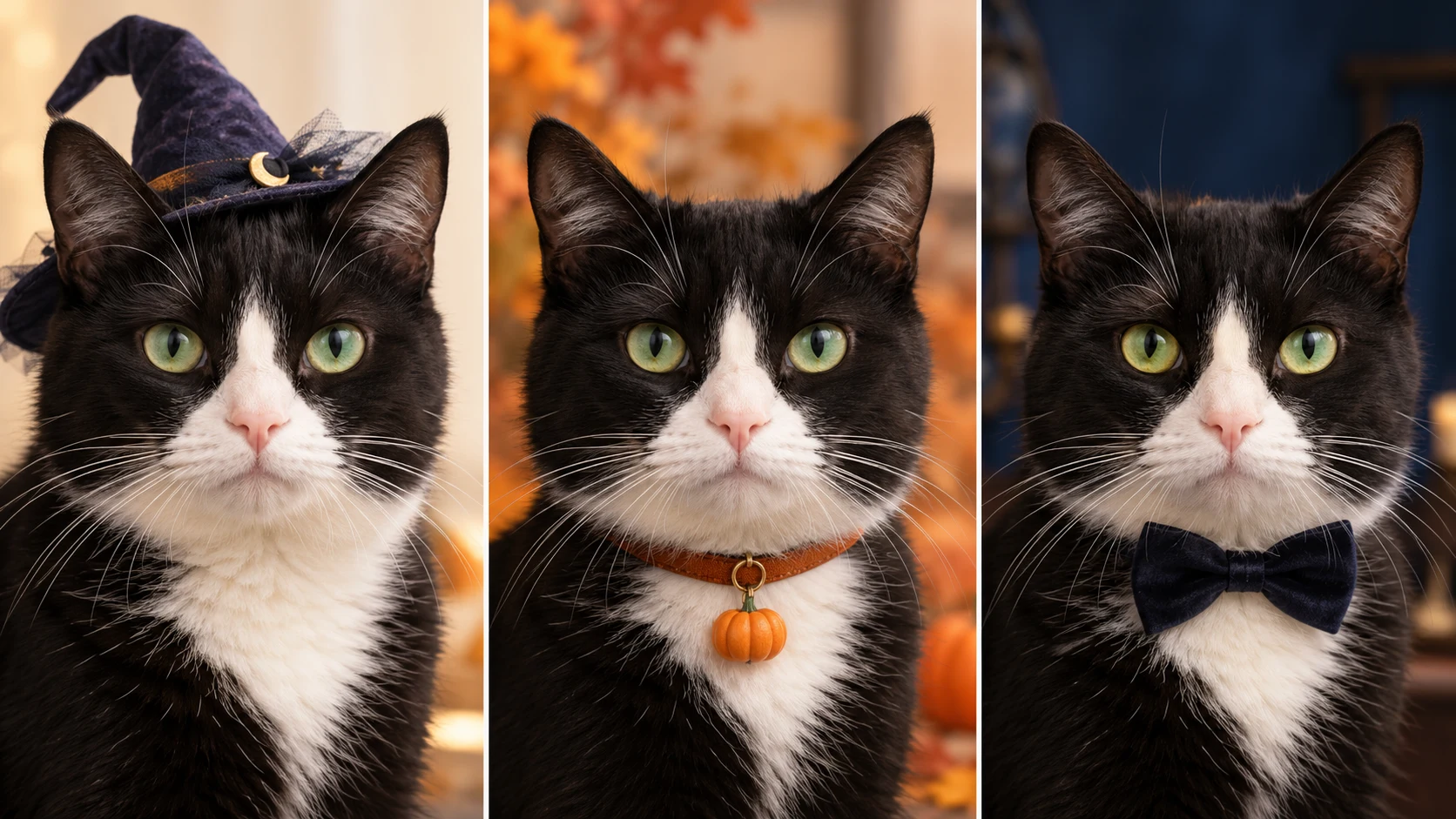
These AI Halloween pet photos are visual concepts, not instructions to put a real costume on an animal. A digital accessory lets you test a seasonal look without asking a reluctant pet to wear anything. If you do choose a physical outfit, the ASPCA's Halloween guidance advises using costumes only when the pet enjoys them and checking that movement, sight, and breathing are not restricted.
1. A small wizard, not a new dog
This works because the idea is legible from a hat and cape. Keep the costume modest so the animal's head remains the main subject. Use an ordinary indoor or porch portrait with enough space around the ears.
Prompt: Edit this photo of my pet into a gentle Halloween wizard portrait. Keep the same pet, exact face, eye color, ear shape, coat markings, body proportions, pose, and camera angle. Add a small dark-blue wizard hat and short cape, with warm autumn light in the background. Leave the eyes and muzzle unobstructed. Keep the result photorealistic and natural. Do not add another animal, extra paws, or text.
2. A pumpkin patch without an oversized pumpkin suit
A pumpkin patch makes the season clear even if the pet wears only a small bandana. It suits full-body photos taken outdoors. Ask for believable ground contact so the animal does not appear to float among props.

Prompt: Keep my pet's exact pose, size, face, ears, coat pattern, paws, and expression. Replace the background with a simple autumn pumpkin patch in soft late-afternoon light. Add one small orange bandana, not a full-body costume. Match the new light and shadows to the original photo. Keep all pumpkins behind or beside the pet, with no object covering the face.
3. A ghost in the scene, while the pet stays visible
A sheet draped over a dog or cat can hide the very details you want to preserve. Put a friendly ghost prop in the background instead. This makes a fun photo without requiring the editor to invent where the animal's face should be beneath fabric.
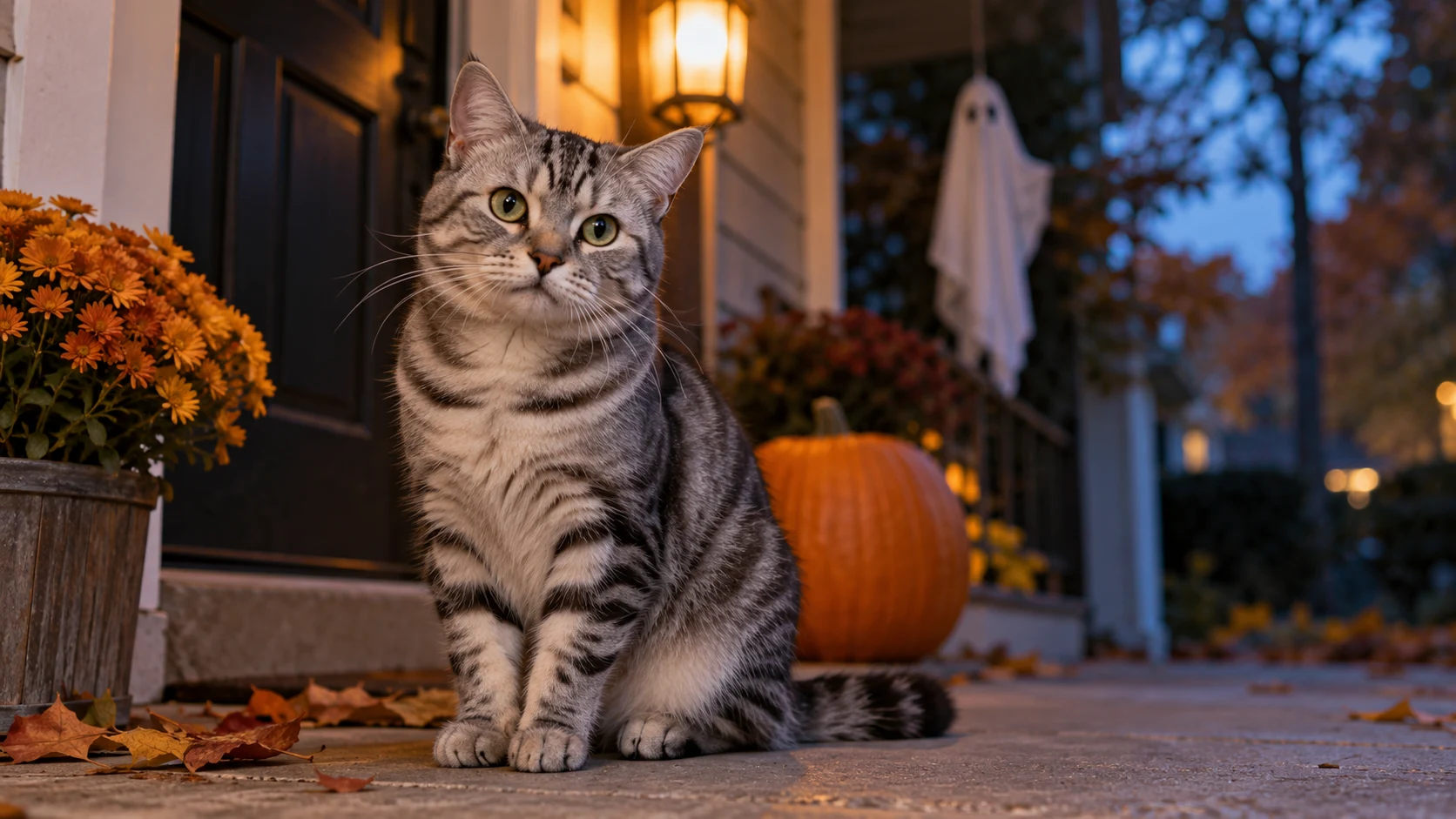
Prompt: Keep my pet completely unchanged in shape, face, coat, pose, and position. Add a small friendly sheet-ghost decoration several feet behind the pet on a softly lit autumn porch. Keep the ghost secondary, with realistic scale and shadow. Do not cover the pet's eyes, ears, whiskers, or paws. No horror character, logo, or writing.
4. A midnight detective portrait
For a pet with a thoughtful expression, use lighting and setting rather than costume detail. A muted navy background and one small accessory make a more convincing portrait than a pile of props.
Prompt: Preserve my pet's identity, including its exact eye color, muzzle, ears, coat markings, and expression. Make the photo a tasteful Halloween detective portrait with a simple dark collar tag and a softly blurred midnight-blue background. Add one warm lantern glow off to the side. Keep the pet bright enough to see natural fur detail. No hat over the ears, no extra objects, and no text.
5. A cozy witch look for a cat or small dog
The familiar pointed hat is enough. Keep it light, correctly scaled, and clear of the animal's eyes. If the AI keeps changing ear anatomy, drop the hat and use a seasonal background instead.
Prompt: Restyle this photo into a cozy Halloween witch portrait while keeping the same pet, face, ears, eyes, whiskers, fur pattern, body shape, pose, and crop. Add a small soft witch hat placed behind the ears and gentle amber window light. Keep the background simple and the animal photorealistic. Do not distort the ears, hide the eyes, add limbs, or include lettering.
Treat each prompt as a starting point. Replace generic words such as “my pet” with two or three real traits: “white chest,” “one folded ear,” or “green eyes.” That detail gives you something concrete to check in the output.
Two more playful costume ideas for dogs and cats
AI Halloween pet photos can be more inventive without hiding the animal beneath an elaborate outfit. These two concepts keep the face clear and use the setting to make the costume easy to understand.
A woodland dragon dog
Small wings and soft horns turn a familiar dog portrait into a storybook scene. Keep the ears visible and ask for natural contact between the costume and fur.

Prompt: Keep my dog's exact face, coat color, ears, tail, paws, size, and pose. Add small moss-green dragon wings behind the shoulders and two soft horns behind the ears. Place the dog on a simple autumn woodland path in warm natural light. Keep the costume modest and photorealistic. Do not cover the eyes or muzzle, change the dog's anatomy, or add flames.
A pirate cat with both eyes visible
A bandana and sailor collar suggest the idea without an eyepatch. A quiet harbor backdrop adds context while leaving the cat as the main subject.
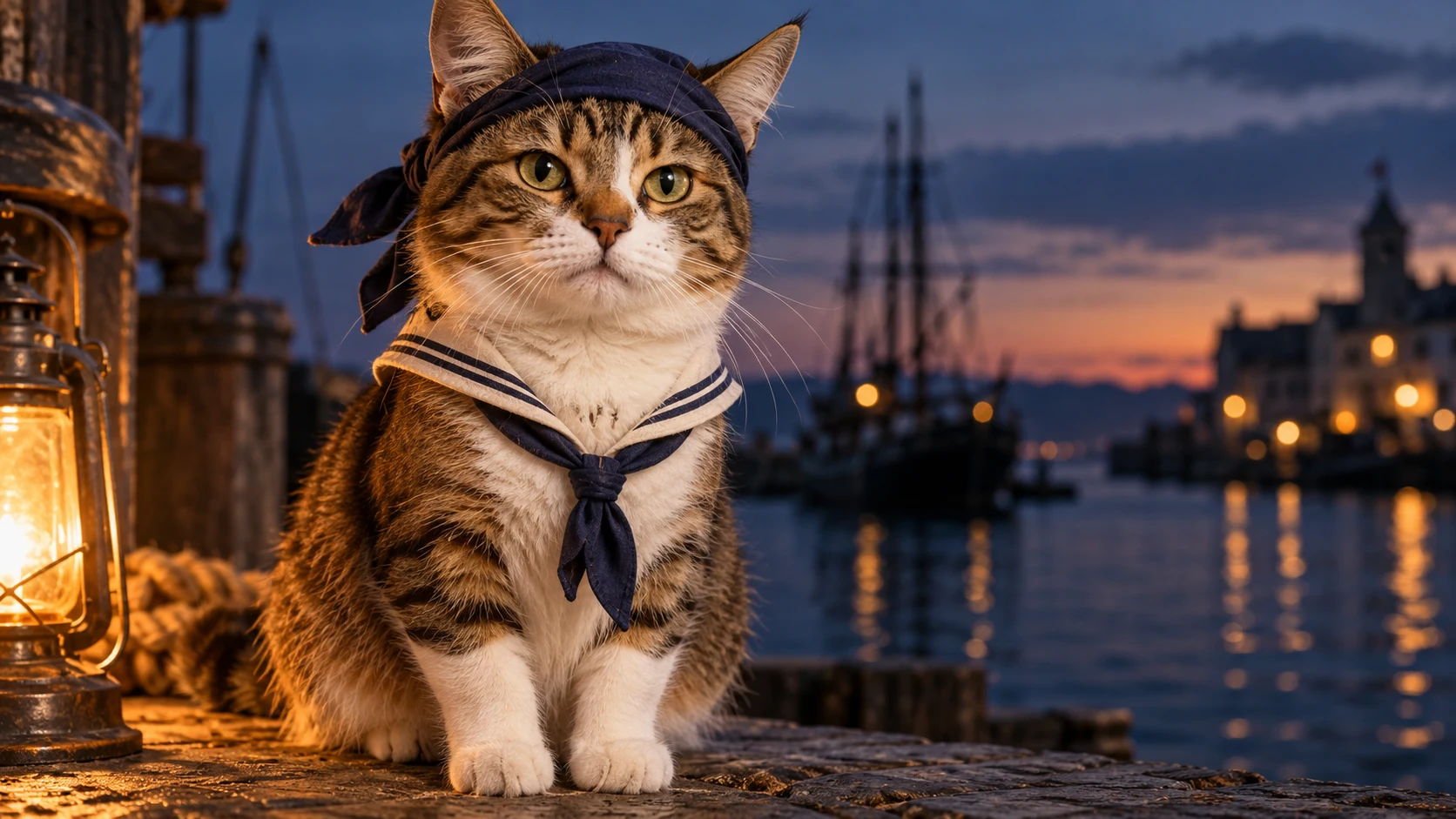
Prompt: Preserve my cat's exact eyes, ears, whiskers, face shape, coat markings, paws, and seated pose. Add a small navy pirate bandana behind the ears and a simple cream sailor collar. Use a softly blurred harbor at dusk with gentle lantern light. Keep both eyes visible. No eyepatch, sword, extra limbs, text, or recognizable franchise costume.
Matching Halloween costumes for pets and owners
For AI Halloween pet photos with an owner, begin with a clear picture that already includes both of you. Ask the editor to preserve both faces and poses, then change only the outfits or setting.
Space explorer and alien dog
An ivory space-explorer outfit for the person and a small sage-green antenna accessory for the dog make a coordinated pair. Keep the dog's expression and ears visible; the pet should not become a background prop.
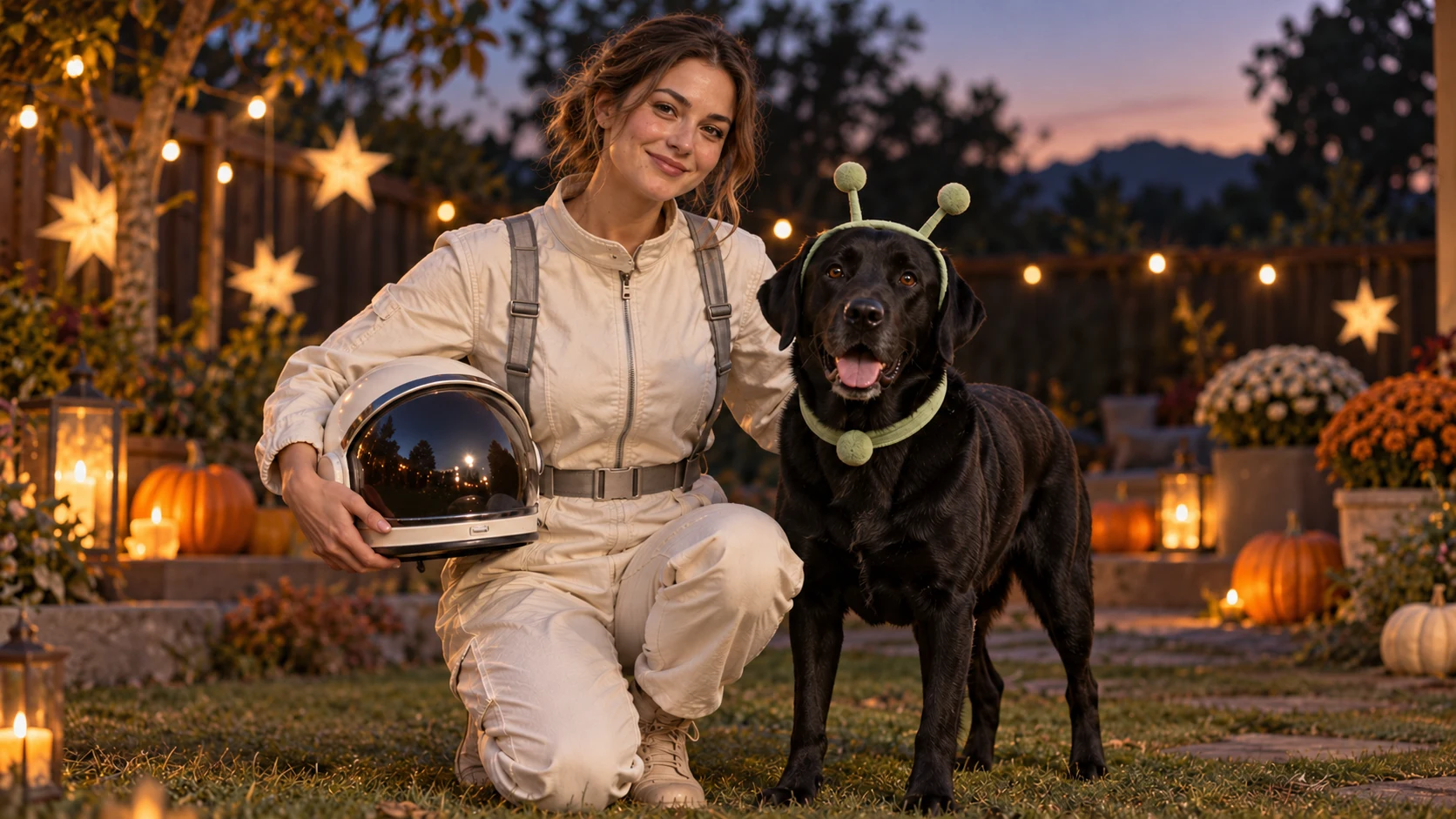
Prompt: Keep the person and dog from this photo recognizable. Preserve the person's face, hair, body position, and hands, and the dog's eyes, muzzle, ears, coat, paws, and size. Change the person's clothing to a simple ivory space-explorer outfit without logos. Give the dog a small soft green alien antenna accessory behind its ears. Add a subtle twilight Halloween background. Keep both subjects equally clear; no extra people, pets, fingers, or paws.
Fortune teller and black cat
A plum shawl and headscarf give the owner a fortune-teller look, while the cat needs only a small crescent-moon collar charm. Let the cat's dark fur remain visible against the softly lit porch.
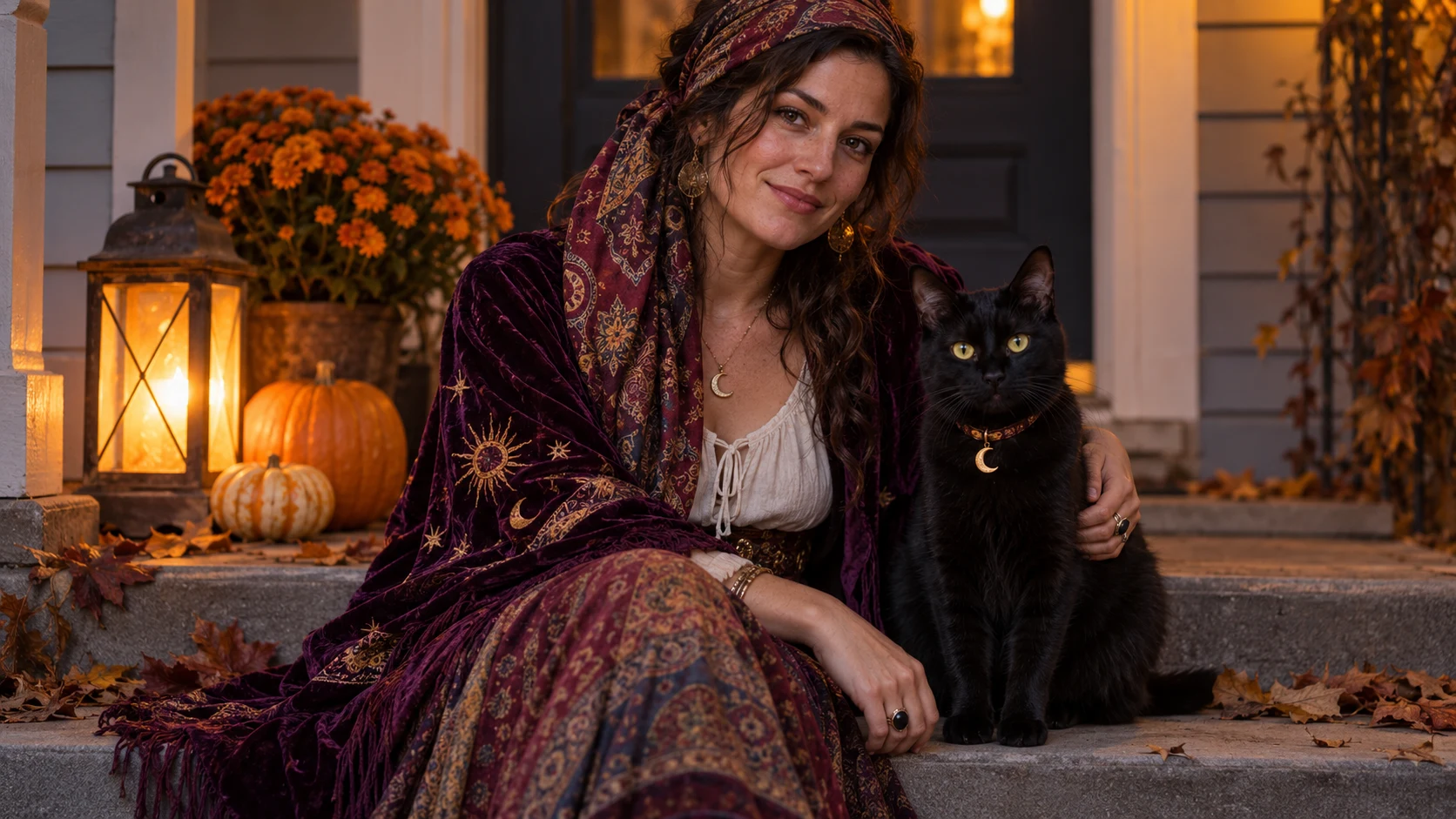
Prompt: Preserve the person and black cat from this photo, including their faces, body positions, proportions, and the cat's eye color and coat. Dress the person in a simple plum shawl and patterned headscarf. Add a small crescent-moon charm to the cat's collar and warm lantern light on an autumn porch. Keep the person's skin naturally textured and the cat's eyes, whiskers, and ears unobstructed. No crystal ball, exaggerated magic effects, extra fingers or paws, text, or logos.
Mad scientist and robot dog
A rumpled lab coat and goggles make the owner's part of the costume clear. A soft silver panel harness gives the dog a playful robot look while leaving its face and legs visible.
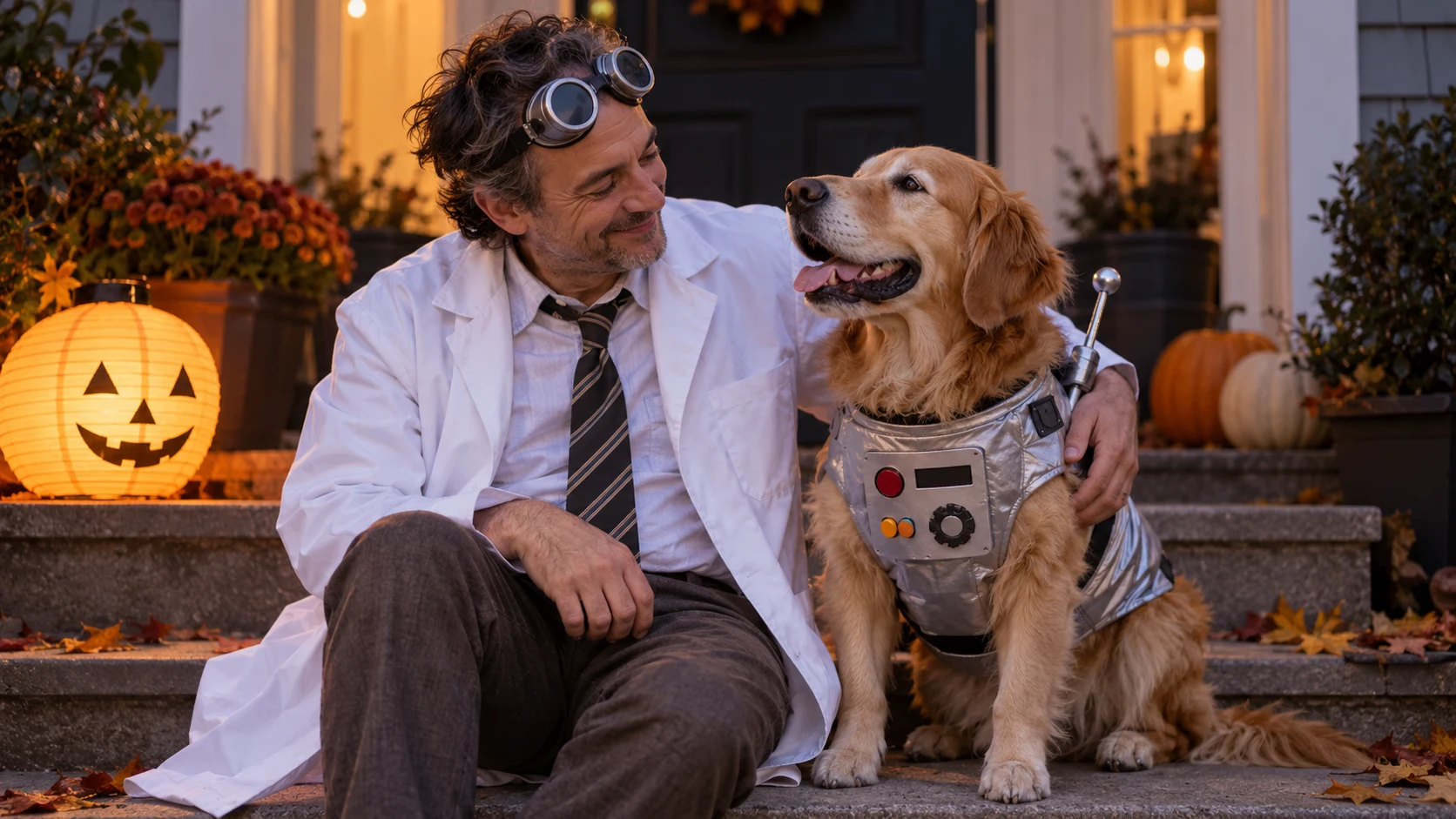
Prompt: Keep the person and dog in the source photo recognizable, including the person's face and hands and the dog's eyes, ears, coat, paws, and size. Change the person's outfit to a slightly rumpled white scientist coat with goggles resting on the forehead. Add a small soft silver robot-panel harness to the dog. Use simple front steps at dusk with warm Halloween light. Keep skin naturally textured and the pet's face and movement unobstructed. No rigid helmet, extra limbs, text, or logos.
How to make AI Halloween pet photos in four steps
AI Halloween pet photos are easier to control when you make one meaningful change at a time. Save your original before trying any variation.
Step 1: Choose the crop and the concept
Decide whether the final image is a square social post, a phone wallpaper, or a portrait card. Crop with enough room for the accessory or background. Then choose one costume idea from the table. A clear concept makes the first result easier to judge.
Step 2: Describe what must remain unchanged
In the first sentence of your prompt, state that the pet's facial structure, ears, eyes, markings, pose, and proportions must stay the same. Then describe the requested edit. This order matters because the reader's goal is a recognizable pet portrait, not merely an attractive Halloween image.
Step 3: Make one edit and compare
Upload the picture to EnhancePhoto.ai's AI Photo Editor, which accepts text instructions. Try a single accessory or background change. Compare the result side by side with the source, especially at the eyes, whiskers, ears, paws, and coat markings. AI may invent plausible detail, so do not assume a polished image is faithful.
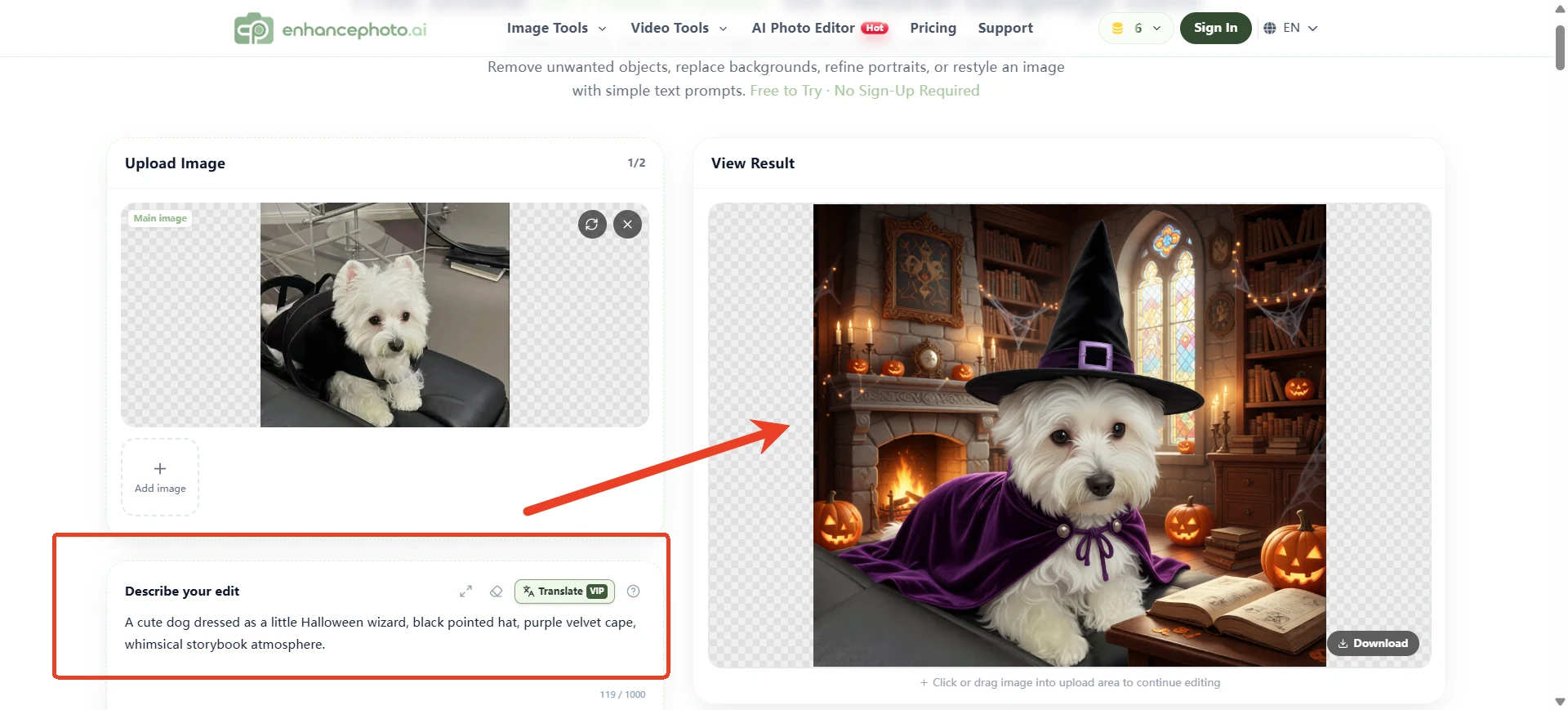
If the result changes the pet too much, make the request smaller: “Keep the animal untouched; only change the background.” You can add a modest costume element in a later pass if the editor supports it. Results vary with the source photo and the requested edit.
Step 4: Finish gently and export
If the composition is right but the image needs a little more light or clarity, apply a restrained photo enhancement pass and compare it with the unenhanced version. Avoid oversharpening fur or brightening a dark scene until it looks flat. Export in a format and size suited to where you will use the image. Keep the untouched original alongside the final edit.
Check that the result is still your pet
The most common failure in AI Halloween pet photos is subtle identity drift. The animal may look cute but have a different face. Before sharing, zoom in and answer these questions:
- Are the eye color, spacing, and catchlights believable?
- Are the ears the same shape and in the same position?
- Do the coat markings, whiskers, and muzzle match the source?
- Are all paws and limbs present, with no extras?
- Does the costume sit around the body instead of merging into fur?
- Does the background match the animal's lighting and shadow?
If the first three answers are no, start over with a simpler edit or a better picture. A faithful seasonal portrait will mean more to its owner than a dramatic one that resembles a different animal.
How EnhancePhoto.ai fits the workflow
EnhancePhoto.ai offers separate tools for different problems. Choose the one that matches the photo you have rather than running every picture through every tool.
| Your starting point | Useful tool | Decision before moving on |
|---|---|---|
| Clear pet photo; you want a costume or new scene | AI Photo Editor | Can you keep the animal recognizable while changing only the requested element? |
| Favorite shot is slightly blurry | Unblur Image | Does the result retain believable eyes and fur? |
| Photo is flat or dim | Image Enhancer | Did light and color improve without changing the animal? |
| Final crop is too small for a larger output | Image Upscaler | Do you actually need more pixels for the destination? |
For AI Halloween pet photos, the editor is the main tool because it accepts a photo and a written request. The other tools are optional finishing steps. Review every output against your original; the website's examples show possible editing workflows, while actual results may vary depending on your specific costume prompt and input photo.
Mistakes that make a pet portrait look artificial
- Asking for too many changes at once. AI Halloween pet photos can lose the animal's identity when a prompt changes outfit, pose, location, and expression together.
- Using a tiny or obstructed source. A costume cannot restore an ear or paw that was hidden in the original.
- Covering the face. Large masks, hoods, and hats defeat the purpose of a portrait from your own pet photo.
- Adding too many themed props. A pumpkin, bat, lantern, cape, and fog can compete with the pet. Choose one or two details.
- Mistaking a concept image for a real costume photo. If you share a heavily edited result, a simple caption such as “AI costume concept” keeps the context clear.
- Treating AI output as a physical fitting guide. A generated cape may look comfortable on screen but says nothing about a real garment's fit or safety.
Frequently asked questions
Can I make a Halloween pet photo without putting my pet in a costume?
Yes. Start with a clear photo and add a digital accessory or seasonal background. Keep the animal's face and body visible, then compare the edited result with the original. A digital concept avoids making a pet wear an outfit for the picture.
What is the best photo for an AI pet costume edit?
An eye-level photo with a sharp face, visible ears, distinctive markings, and enough space for the intended accessory. Use a full-body image if the costume needs to cover the torso or legs. A headshot is better for a hat or collar than for a complete outfit.
Why does the AI version look like a different dog or cat?
The source may be too small or obstructed, or the prompt may request too many changes. Try a clearer image, name the pet's distinctive features, and change only the background or one accessory. Discard the result if the face, ears, or coat pattern still drift.
Can I use one photo for several Halloween looks?
Yes. Keep the same source and crop for each variation, and save each result separately. A consistent source makes it easier to compare AI Halloween pet photos and notice when a version changes the animal's identity.
Should I edit the pet photo or generate an entirely new image?
Edit an existing photo when the goal is a recognizable portrait of your own pet. Generate from text when you want an original fictional animal or a background concept. A text-only image has no reliable visual reference for your pet's exact markings and face.
A final rule for a portrait worth keeping
AI Halloween pet photos work best when the pet remains the star and the Halloween idea stays small. Choose a clear source, make one focused edit, inspect the result against the original, and keep only the versions that still look like your animal. One picture can support several playful costume ideas; it does not need to become a different pet to feel festive.